User guide
General Suggestions
Document and Communicate Inputs
Document and communicate inputs used and any changes made to the model. For example, published reports or journal articles should include enough information so that others can reproduce your work.
Emphasize Aggregated Results
Emphasize aggregated results rather than results for a specific region or year, given that aggregate results will be more robust. For example, the magnitude of new wind builds identified across a multistate region will be substantially more robust result than wind builds in a single ReEDS region. Similarly, the magnitude of natural gas combined cycle capacity additions across a multiyear period (e.g., 2030-2040) will be more robust result than the amount added in a single year (e.g., 2032).
We recommend this practice because:
ReEDS results at their finest resolution can be sensitive to small changes in assumptions. For example, small differences in natural gas prices between two adjacent regions could lead to large disparities in gas-based capacity expansion in those regions that ignore practical constraints that might produce more even deployment.
ReEDS was designed as a national-scale model. That level of geographic scope means that many local conditions important to power plant build decisions might not be captured.
Emphasize Trends or Scenario Differences
Emphasize trends or scenario differences over absolute results. For example, the result that photovoltaic (PV) deployment is highly sensitive to natural gas price is more robust than the specific amounts of PV capacity deployed under high and low gas price scenarios.
Understand Calculations Behind Reported Numbers
Do not rely on parameter names or labels alone when interpreting results. Explore the underlying calculations to ensure a robust understanding of the parameter and what it means. For example, reported electricity prices represent the marginal cost of meeting an additional infinitesimally small amount of load. They do not consider existing real-world market structure, rate design, or distribution costs, and thus should not be interpreted as estimates of retail rates.
Employ Scenario Sensitivity Analysis
Always employ scenario sensitivity analysis. ReEDS is a deterministic model, so uncertainties are not captured in individual model runs.
Deliberately Choose Model Inputs
Be deliberate in how you choose model inputs. The ReEDS default values are not necessarily “most likely,” and “high” and “low” input options are not based on specific probabilities of occurrence.
Keep Questions Within Model’s Scope
Ensure that your questions are within the scope of the model. ReEDS is primarily meant to inform decisions at the investment or planning timescales in the bulk power sector. For other questions at different timescales (such as unit commitment questions) or touching other sectors (such as distributed generation adoption), other models should be used. However, ReEDS might be used to inform inputs or identify analysis questions for these other models.
Cautiously Use Near-Term Results
Use near-term results with caution. We have designed ReEDS primarily to consider long-term questions, and as such, not all near-term power sector changes are represented.
Large input files
Large input files,
including hourly electricity demand projections and hourly capacity factor profiles for solar and wind,
are hosted remotely.
The URLs for the remote files are stored in inputs/remote_files.csv.
At the start of a ReEDS run (or when running reeds/remote.py),
if the required files are not already present,
they are downloaded from the host to inputs/remote.
The name of each file in inputs/remote ends with the record_id from inputs/remote_files.csv;
multiple different versions of a single file can thus be kept in the inputs/remote folder to help avoid unnecessary downloads when switching between branches or commits that reference different versions of the file.
During a ReEDS run, links to the versions used by the present commit are saved to inputs/profiles_cf and inputs/profiles_demand, without the record_id.
Code within ReEDS should generally point to the links in inputs/profiles_cf and inputs/profiles_demand instead of to a specific version of a record.
Here is partial list of remotely hosted files used by ReEDS:
Temporal resolution
Temporal resolution switches
GSw_HourlyNumClustersspecifies the maximum number of representative periods.Two other switches,
GSw_HourlyPeakLevelandGSw_HourlyMinRElevel, indicate additional “outlying periods” that can be added (peak-load-containing periods forGSw_HourlyPeakLevel, minimum-average-PV-CF and minimum-average-wind-CF periods forGSw_HourlyMinRElevel). If running the US and both are set to “interconnect”, they add the 3 peak-load days, 3 minimum-wind days, and 3 minimum-PV days by interconnect, resulting in 33+9=42 by default ifGSw_HourlyNumClusters=33. These “outlying periods” are only included when using capacity credit (GSw_PRM_CapCredit=1) instead of stress periods (GSw_PRM_CapCredit=0).When using
GSw_HourlyClusterAlgorithm=optimized(the default), then depending on the setting ofGSw_HourlyClusterRegionLevelthere will be a maximum number of days it needs to reproduce the distribution of load/pv/wind. WhenGSw_HourlyClusterRegionLevel=transreg(the default), there are 11 regions and 3 features, so it needs ~33 days to reproduce the distribution (like an eigenvalue problem).So turning up
GSw_HourlyNumClusterson its own won’t increase the temporal coverage. If you want more temporal coverage, the options are:Switch to
GSw_HourlyType=wek, which increases the length of the periods from 1 day to 5 days. If all the other switches are left at their defaults, switching towekwould increase the coverage from 42 days to 5*42=210 days.Reduce
GSw_HourlyClusterRegionLevelto something smaller than transreg (likest), and then increaseGSw_HourlyNumClustersSwitch to
GSw_HourlyClusteAlgorithm=hierarchicaland then increaseGSw_HourlyNumClusters(although that’s less desirable, because hierarchical clustering doesn’t do as good of a job of reproducing the actual spatial distribution of CF and load)Switch to
Gsw_HourlyType=year. Although if you’re running for the whole US you’ll need to turn on region aggregation (GSw_ZoneSetin [z54orz70]) for it to solve.
GSw_HourlyClusterAlgorithmIf set to ‘hierarchical’, then hierarchical clustering is used via
sklearn.cluster.AgglomerativeClustering(
    n_clusters=int(sw['GSw_HourlyNumClusters']),
    affinity='euclidean', linkage='ward')
If set to ‘optimized’, then a two-step custom optimization is performed using the
hourly_repperiods.optimize_period_weights()andhourly_repperiods.match_act2rep_milp()functions to minimize the deviation in regional load and PV/wind CF between the weighted representative periods and the full year.If set to a string containing the substring ‘user’, then instead of optimizing the choice of representative periods for this run, the model reads a user-supplied file at
inputs/temporal/period_szn_{GSw_HourlyClusterAlgorithm}.csv.So if you want to use the example period:szn map, set
GSw_HourlyClusterAlgorithm=userand provideinputs/temporal/period_szn_user.csv.If you want to specify a different period:szn map, then create a file with your label in the filename and set
GSw_HourlyClusterAlgorithmto that same label (which must contain the substring ‘user’). For example, forGSw_HourlyClusterAlgorithm=user_myname_20230130, provideinputs/temporal/period_szn_user_myname_20230130.csv.Make sure the settings for
GSw_HourlyTypeandGSw_HourlyWeatherYearsmatch your user-defined map. For example, if your user-defined map includes 365 representative days for weather year 2012, then setGSw_HourlyType=dayandGSw_HourlyWeatherYears=2012.You can feed the period:szn mapping from a completed run into the inputs folder of your repo to force ReEDS to use the same representative or stress periods. More detail can be found in the postprocessing tools guide.
GSw_PRM_StressThreshold: The default setting of ‘transgrp_1_EUE_sum’ means a threshold of “1 ppm NEUE in each transgrp”, with stress periods selected by the daily sum of EUE within each transgrp.The first argument can be selected from [‘country’, ‘interconnect’, ‘nercr’, ‘transreg’, ‘transgrp’, ‘st’, ‘r’] and specifies the hierarchy level within which to compare RA performance against the threshold.
The second argument can be any float and specifies the RA performance threshold in parts per million [ppm].
The third argument can be ‘NEUE’ or ‘EUE’, specifying which metric to use when selecting stress periods. If set to ‘NEUE’ the model will add stress periods with the largest fraction of dropped load; if set to ‘EUE’ the model will add stress periods with the largest absolute MWh of dropped load.
The fourth argument can be ‘sum’ or ‘max’, specifying whether to add stress periods in order of their daily per-hour max dropped load or by their daily sum of dropped load when selecting stress periods.
If desired you can provide /-delimited entries like ‘transgrp_10_EUE_sum/country_1_EUE_sum’, meaning that each transgrp must have ≤10 ppm NEUE and the country overall must have ≤1 ppm NEUE.
Conventions
Timestamps are formatted as
y{year}d{day of year}h{hour of day}in hour-ending format in Eastern Standard Time. The numbering of days begins at 1. For example, the hour from 3am-4am on January 3, 2012 would be indicated asy2012d003h004.When using representative weks (5-day periods), timestamps are instead formatted as
y{year}w{wek of year}h{hour of wek}. The numbering of weks begins at 1. In this format, the hour from 3am-4am on January 3, 2012 would be indicated asy2012w001h052.
Representative and stress periods (indexed as
sznwithin ReEDS) are labeled similarly to timestamps but without theh{hour of day}component…Except stress periods and stress timeslices have an ‘s’ prefix. So if the time period above showed up as a stress period, it would be labeled as
h=sy2012d003h004andszn=sy2012d003for representative days (orh=sy2012w001h052andszn=sy2012w001for representative weks). Stress periods are modeled using different loads and transmission capacities than representative periods, so they need to be indexed separately.
Electricity Demand Profiles
Switch options for GSw_LoadProfiles
The hourly load files are hosted remotely as described in Large Input Files.
The GSw_LoadProfiles switch corresponds to a file saved to inputs/remote/demand_{GSw_LoadProfiles}_{record_id}.h5 and its link at inputs/profiles_demand/demand_{GSw_LoadProfiles}.h5.
Switch Name |
Description of Profile |
Origin |
Weather year included |
|---|---|---|---|
historic |
Detrended historic demand from 2007-2013 and 2016-2023. This is multiplied by annual growth factors from AEO to forecast load growth. |
Produced by the ReEDS team from a compilation of data sources. More detail can be found in the hourlize readme. |
2007-2013 & 2016-2023 |
EFS_Clean2035_LTS |
Net-zero emissions, economy wide, by 2050 based on the White House’s Long Term Strategy as shown here: https://www.whitehouse.gov/wp-content/uploads/2021/10/US-Long-Term-Strategy.pdf |
Developed for the 100% Clean Electricity by 2035 study: https://www.nlr.gov/docs/fy22osti/81644.pdf |
2007-2013 |
EFS_Clean2035 |
Accelerated Demand Electrification (ADE) profile. This profile was custom made for the 100% Clean Electricity by 2035 study. More information about how it was formed can be found in https://www.nlr.gov/docs/fy22osti/81644.pdf Appendix C. |
Developed for the 100% Clean Electricity by 2035 study: https://www.nlr.gov/docs/fy22osti/81644.pdf |
2007-2013 |
EFS_Clean2035clip1pct |
Same as Clean2035 but clips off the top 1% of load hours. |
Developed for the 100% Clean Electricity by 2035 study: https://www.nlr.gov/docs/fy22osti/81644.pdf |
2007-2013 |
EFS_HIGH |
Features a combination of technology advancements, policy support and consumer enthusiasm that enables transformational change in electrification. |
Developed for the Electrification Futures Study https://www.nlr.gov/docs/fy18osti/71500.pdf. |
2007-2013 |
EFS_MEDIUMStretch2046 |
An average of the EFS_MEDIUM profile and the AEO reference trajectory. This was created to very roughly simulate the EV and broader electrification incentives in IRA, before we had better estimates of the actual effects of IRA. |
NLR researchers combined the EFS_MEDIUM profile and the AEO reference trajectory. |
2007-2013 |
EFS_MEDIUM |
Features a future with widespread electrification among the “low-hanging fruit” opportunities in electric vehicles, heat pumps and select industrial applications, but one that does not result in transformational change. |
Developed for the Electrification Futures Study https://www.nlr.gov/docs/fy18osti/71500.pdf. |
2007-2013 |
EFS_REFERENCE |
Features the least incremental change in electrification through 2050, which serves as a baseline of comparison to the other scenarios. |
Developed for the Electrification Futures Study https://www.nlr.gov/docs/fy18osti/71500.pdf. |
2007-2013 |
EER2023_Baseline_AEO2022 |
Business as usual load growth. Based on the service demand projections from AEO 2022. This does not include the impacts of the Inflation Reduction Act. |
Purchased from Evolved Energy Research in June 2023 for the National Transmission Planning Study and to update our load profiles in general. More information can be found in EER’s 2022 Annual Decarbonization Report. This is the “Baseline” scenario in EER’s 2022 ADP. |
2007-2013 |
EER2023_IRAlow |
Modeling load change under conservative assumptions about the Inflation Reduction Act |
Purchased from Evolved Energy Research in June 2023 for the National Transmission Planning Study and to update our load profiles in general. This scenario is unfortunately not described in EER’s 2022 ADP. It was originally prepared for the Princeton REPEAT project. Please cite the Princeton REPEAT project when using this profile. |
2007-2013 |
EER2023_IRAmoderate |
Modeling load change under moderate assumptions about the Inflation Reduction Act |
Purchased from Evolved Energy Research in June 2023 for the National Transmission Planning Study and to update our load profiles in general. This scenario is unfortunately not described in EER’s 2022 ADP. It was originally prepared for the Princeton REPEAT project. Please cite the Princeton REPEAT project when using this profile. |
2007-2013 |
EER2023_100by2050 |
100% decarbonization by 2050 scenario. This does not explicitly include the impacts of the Inflation Reduction Act. However, due to its decarbonization, it is a more aggressive electrification profile than EER2025_IRAlow. |
Purchased from Evolved Energy Research in June 2023 for the National Transmission Planning Study and to update our load profiles in general. More information can be found in EER’s 2022 Annual Decarbonization Report. This is the “Central” scenario in EER’s 2022 ADP. |
2007-2013 |
EER2025_Baseline_AEO2023 |
Business as usual load growth. Based on the service demand projections from AEO 2023. This does not include the impacts of the Inflation Reduction Act. |
Purchased from Evolved Energy Research in 2024. More information can be found in EER’s 2024 Annual Decarbonization Report. This is the “Baseline” scenario in EER’s 2024 ADP. |
2007-2013 & 2016-2023 |
EER2025_IRAlow |
Modeling load change under conservative assumptions about the Inflation Reduction Act |
Purchased from Evolved Energy Research in 2024. This scenario is not described in EER’s 2024 ADP. It is most similar to the “Current Policy” scenario; however, that scenario has “moderate assumptions about the Inflation Reduction Act” compared to this scenario which has “conservative assumptions about the Inflation Reduction Act”. This scenario was originally prepared for the Princeton REPEAT project. Please cite the Princeton REPEAT project when using this profile. |
2007-2013 & 2016-2023 |
EER2025_100by2050 |
100% decarbonization by 2050 scenario. This does not explicitly include the impacts of the Inflation Reduction Act. However, due to its decarbonization, it is a more aggressive electrification profile than EER2025_IRAlow. |
Purchased from Evolved Energy Research in 2024. More information can be found in EER’s 2024 Annual Decarbonization Report. This is the “Central” scenario in EER’s 2024 ADP. |
2007-2013 & 2016-2023 |
Resources for more info about ReEDS’s load profiles
Standard Scenarios 2024 has a appendix that synthesizes what is included in these demand profiles in more detail. See pg 37-45 for more information. Note that this describes the previous batch of EER profiles from June 2023; however, the high level trends will be largely consistent between the previous and current profiles.
ADP 2024’s Technical Documentation lists many of their underlying stock assumptions.
EER’s docs page if you want a deeper look into their modeling.
Different weather years
For EER’s load profiles, “weather” includes everything considered by NLR’s ResStock and ComStock building models (i.e., temperature, humidity, insolation, and wind speed). This information gets translated into variations in load through regressions and benchmarking with historical system load data for the weather year in question.
Demand Response
Demand response is turned off by default. To enable it the following switches are needed:
GSw_DRShed: turns on/off the demand response resourceGSw_MaxDailyCF: turns on/off daily maximum capacity factor constraintdr_shedscen: scenario to define which scalars will be used for the supply curve cost and capacity
Hydrogen inputs
Most hydrogen input files are in the inputs/consume/ folder.
consume_char_[GSw_H2_Inputs].csv
Contains cost and performance assumption for electrolyzers and steam-methane reformer.
Electrolyzer capital cost assumptions are based on the Pathways to Commercial Liftoff: Clean Hydrogen Report [see values in the footnotes of Figure 3 on page 14]. The reference scenario assumes linearly decline from 1750 \(/kW in 2022 to 550 \)/kW in 2030, and then remain constant after. The low cost scenario assumes further declines from 2030 to 2050.
Fixed O&M values are assumed to be 5% of CAPEX (source: https://iopscience.iop.org/article/10.1088/1748-9326/acacb5)
Electrolyzer performance (efficiency) as well as SMR cost and performance assumptions are derived from assumptions H2A: Hydrogen Analysis Production Models, with guidance from Paige Jadun. See original input assumptions in the ReEDS_Input_Processing repo.
Note that SMR costs are currently in 2018\( and electrolyzer costs are in 2022\).
h2_transport_and_storage_costs.csv
Investment |
Cost type |
Units |
|---|---|---|
Pipelines |
Overnight Capital Cost |
$/[(metric ton/hour)*mile] |
Pipelines |
FOM |
$/[(metric ton/hour)mileyear] |
Pipelines |
Electric load |
MWh/metric ton |
Compressors |
Overnight Capital Cost |
$/(metric ton-hour) |
Compressors |
FOM |
$/[(metric ton/hour)*year) |
Compressors |
Electric load |
MWh/metric ton |
Storage |
Overnight Capital Cost |
$/metric ton |
Storage |
FOM |
$/(metric ton*year) |
Storage |
Electric load |
MWh/metric ton |
The values in H2_transport_and_storage_costs.csv are based on raw data provided from the SERA model by Paige Jadun.
The raw data are formatted by the process-h2-inputs.py script in the input processing repository.
Intra-Regional Hydrogen Transport Cost
Flat cost for intra-ReEDS BA hydrogen transport and storage in $/kg H2 produced.
Specified via GSw_H2_IntraReg_Transport.
Default value assumes transport via pipelines and is from 2023 DOE Clean Hydrogen Liftoff Report pg 15.
Transport costs could be more expensive if you assume other methods of H2 transport (ex. trucking).
Note: this cost is only assessed for new plants (those that fall in the newv(v) set), not existing H2 producers.
This is because existing hydrogen plants likely have already installed the necessary infrastructure to connect to a hydrogen demand center (likely an industrial plant) and that infrastructure was likely sized appropriately for the consumers needs.
Therefore, that H2 producer shouldn’t pay an additional investment cost for intra-regional hydrogen transport since they will not be transporting hydrogen elsewhere.
However, new hydrogen producing plants, especially in a decarbonized power system or if a large hydrogen economy manifests, might not be physically close to the hydrogen consumers and therefore should pay this cost.
h2_storage_rb.csv
Mapping of ReEDS balancing are to available H2 storage type. Since costs are always ordered (saltcavern < hardrock < above ground), BAs with access to saltcaverns or hardrock storage are only assigned to the cheapest option to reduce the model size.
Retail adder for electrolytic load
One option for the retail adder for electrolytic load (
GSw_RetailAdder) is derived from the difference between the industrial average rate and the ReEDS wholesale cost. The calculation below is done in 2023 dollars:National average energy price paid in 2023 by industrial consumers (via EIA 861, https://www.eia.gov/electricity/data/eia861m/ –> sales and revenue –> download data. This value is the sales weighted average): $80.55/MWh
ReEDS average wholesale cost from 2023 Standard Scenarios Mid-case in model 2026 (since we cannot find quality empirical wholesale prices): $41.78/MWh
Difference between the industrial average rate and the wholesale cost: $39/MWh
Deflated to 2004 dollars: $28/MWh
Note: please be aware that ReEDS’s solutions are very sensitive to this switch.
With GSw_RetailAdder=28, there is very little to no electrolytic hydrogen.
With GSw_RetailAdder=0 and with exogenous H2 demand, you may see nearly all of the exogenous H2 demand profile being met by electrolyzers and/or a large endogenous H2 economy.
Hydrogen Production Tax Credit (45V)
The regulation itself
The hydrogen production tax credit was enacted in the Inflation Reduction Act in 2022. It is commonly referred to as 45V due to the section of the tax code it is in. It provides up to $3 per kg of H2 produced (2022 USD, credit amount is inflation adjusted in subsequent years), based on the lifecycle emissions of hydrogen production as shown in the table below. These lifecycle greenhouse gas emissions only includes emissions only through the point of production (i.e. does not include hydrogen transport or storage).
Since the largest component of the lifecycle emissions of electrolytic hydrogen production is the carbon intensity of the generators powering the electrolyzer, the main point of contention for this regulation has been how to define the carbon intensity of electricity. The Department of the Treasury proposed guidance on December 22, 2023 stating the requirements for demonstrating the CO2 intensity of H2 production and published their final rules on January 3, 2025. This press release has a nice summary.
Life-cycle Emissions (kg CO2-e / kg H2) |
PTC (2022$ / kg H2) |
CO2 intensity of electricity to meet incentive required through electrolysis (tonnes CO2 / MWh) |
|---|---|---|
[4, 2.5] |
0.6 |
[.07, .045] |
(2.5, 1.5] |
0.75 |
(.045, .027] |
(1.5, 0.45] |
1 |
(.027, .007] |
(0.45, 0] |
3 |
(.008, 0] |
To ensure the low carbon intensity of the electricity powering electrolyzers, the hydrogen production tax credit has three “pillars” or core components, as described below:
Incrementality (also referred to as additionality): generators must have a commercial online date no more than three years before a H2 production facility’s placed in service date to qualify. Example: if an electrolyzer is put in service in 2028, only generators whose commercial operations dates are between 2025-2028 may qualify to power this electrolyzer. This requirement starts immediately. There are special exceptions for nuclear, CCS and states with robust GHG emission caps - we do not model these additional pathways in ReEDS.
Hourly matching: each MWh must be consumed by an electrolyzer in the same hour of the year in which it was generated.
Deliverablity: each MWh must be consumed by an electrolyzer in the same region in which it was generated. Regional matching is required at the National Transmission Needs Study region level, which corresponds to the H2 PTC region level shown in Fig. 18.
Source: Guidelines to Determine Well-to-Gate GHG Emissions of Hydrogen Production Pathways using 45VH2-GREET 2023, 2023, Figure 2
These three pillars are combined differently depending on which year it is:
2024-2029: annual matching, regional matching, additionality required
2030 onwards: hourly matching, regional matching, additionality required
Please see the Department of the Treasury final rules if you want to learn more.
How is this regulated?
There will be a system of trading credits, which are called Energy Attribute Credit (EACs). This is similar to Renewable Energy Credits (RECs). Qualifying clean technologies produce EACs which are tracked by region, vintage (commercial online year), and hour in which they are produced. Electrolyzers must purchase and retire EACs for all MWh used in order to receive the 45V credit.
Which generating technologies qualify to produce Energy Attribute Credits?
The law is technology neutral and does not stipulate which technologies can or cannot produce an EAC, it only specifies the lifecycle emissions of hydrogen production, which is calculated by the GREET Model out of Argonne National Lab. This model considers the carbon intensity of the electricity from various sources. You can reverse calculate the range of CO2 intensity of electricity required to meet the various incentive levels (assuming H2 production via electrolysis). These are the values in the 3rd column of the table above. Based on their low CO2 emissions, qualifying clean technologies could include: wind, solar PV, nuclear, gas with CCS, geothermal and hydropower.
What years does the hydrogen production tax credit apply to?
The hydrogen production tax credit took effect immediately, so in 2023. Projects must begin construction by 2033. The credit can be received for 10 years. Therefore, the latest we would see plants receiving 45V through 2042. If the final regulations include a 4-hr year safe harbor (consistent with other tax credits such as the PTC and ITC), then projects receiving 45V could consutrction as late as by 2037 and receive 45V through 2046.
Intersection with other tax credits and policies
Section 45Y PTC and Section 48E ITC
45V can be stacked with the PTC/ITC. This is because it is two different plants which are claiming the credit. Example: a wind plant could produce a MWh of energy and receive the generation PTC for that energy produced. That energy could power an electrolyzer which could then receive 45V.
Section 45Q - carbon capture and sequestration
The same plant cannot claim both 45Q and 45V. So for example, an SMR-CCS plant cannot claim both 45Q for their carbon capture and 45V for their hydrogen production. They must choose one. We calculated that 45Q will be most valuable for most SMR-CCS plants and therefore assume that they take that in the model.
However, a gas-CCS plant could produce a MWh of energy and receive 45Q for that energy produced. Since they are a relative clean generator per their lifecycle emissions, this energy produces a EAC. So the gas-CCS plant would receive 45Q and the electrolyzer would receive 45V. People frequently confuse this. Only the hydrogen producer receives 45V. Generating technologies are merely creating the Energy Attribute Credit which hydrogen producers need to prove that their electricity is “clean enough”.
RECs
A generating technology can choose to produce a REC or an EAC, but not both.
Implementation in ReEDS
Qualifying clean technologies produce Energy Attribute Credits (EACs, similar to the REC system) which are tracked by region (h2ptcreg), vintage (commercial online year), and hour in which they are produced.
Qualifying clean technologies include: wind, solar PV, nuclear, gas with CCS, geothermal, hydropower
These are defined by the set i_h2_ptc_gen(i) and carried through the model as valcap_h2ptc and valgen_h2ptc
Electrolyzers must purchase and retire EACs for all MWh used in order to receive the 45V credit
This is accomplished via the new variable CREDIT_H2PTC(i,v,r,allh,t)
Pre-2030 those EACs can be generated at any time within the year the H2 is generated; 2030 and later the EACs must be matched hourly
Simplifying assumption used for vintage: generators must have a commercial online date in 2024 or later in order to qualify as an EAC producer
Applied by restricting valcap_h2ptc to have firstyear_v(i,v)>=h2_ptc_firstyear
Assumptions
We only represent technologies which qualify for the less than 0.45 kg CO2e/kg H2 lifecycle emissions category. There may be relatively clean generators that qualify for lower \( amounts of the PTC. However, since the \)3/kg is so lucrative, it is assumed that all H2 producers will comply with the mechanisms required to prove the cleanliness of their electricity.
This PR consists of only grid-connected electrolyzers. We did not include off grid systems due to insufficient evidence of their BOS costs, logistical tractability and more. However, there may be off-grid systems which are cost competitive with grid connected systems.
SMR with CCS could technically receive the H2 PTC. However, our back of the envelope calculations show that SMR w/ CCS plants are more likely to take 45Q so that is why ReEDS currently assumes that only electrolyzers take the H2 PTC.
We force all electrolyzers to take 45V, and therefore we force there to be 45V-credited generation if there is electrolyzer load. Our logic was that for an electrolyzer to be cost competitive with SMR or SMR-CCS, it would need and want to take the $3/kg 45V. This assumption is enforced by the constraints
eq_h2_ptc_region_balanceandeq_h2_ptc_region_hour_balance.
Recommended switches to incorporate the hydrogen production tax credit into a run
Switch |
Value |
Recommend or Required for running with the H2 PTC enabled |
Function |
|---|---|---|---|
GSw_H2_PTC |
1 |
Required |
Turns on and off hydrogen production tax credit |
GSw_H2 |
2 |
Recommended |
Representation of hydrogen supply/demand balance. Sw_H2=1 will not cause the model to fail but it is not recommended for the most accurate representation of the H2 PTC. |
GSw_H2_Demand_Case |
Anything except ‘none’ |
Recommended |
Annual H2 demand profile |
GSw_H2_IntraReg_Transport |
0.32 |
Recommended |
Flat cost for intra-ReEDS BA hydrogen transport and storage in $2004 / kg H2 produced. Note: This is now included as the default representation even if the H2 PTC is not enabled. This is assuming transport via pipelines. Transport costs could be more expensive if you assume other methods of H2 transport (ex. trucking). |
GSw_RetailAdder |
$0/MWh |
Recommended |
2004$/MWh adder to the cost of energy consumed by hydrogen producing facilities and direct air CO2 capture facilities. Included to represent the non-bulk-power-system costs of increasing electrical loads that are not captured within ReEDS. The default value of 0 indicates an assumption that these facilities are large enough to participate directly in wholesale markets. |
Other Notes
The final version of the regulation will not be published until later in FY24, at which point this documentation will be updated to reflect the final regulations.
Fun fact: There is an Investment Tax Credit (ITC) component to 45V. However, all analyses (both ours and from other research groups) indicate that hydrogen producing facilities will choose to take the H2 PTC so in ReEDS we exclusively model the PTC.
Supply curves
Supply curve switches
Supply curve “access” scenarios: these switches are used to toggle across the different supply curve scenarios from reV.
GSw_SitingGeoGSw_SitingUPVGSw_SitingWindOfsGSw_SitingWindOns
For geothermal there are additional switches for toggling between using reV and ATB based supply curves:
geohydrosupplycurveegssupplycurveegsnearfieldsupplycurve
Pumped storage supply curves can also be specified using pshsupplycurve.
The number of cost bins used to represent the reV-based supply curve technologies can be set dynamically by the numbins switches:
numbins_windonsnumbins_windofsnumbins_upvnumbins_cspnumbins_geohydro_allkmnumbins_egs_allkm
In addition, the GSw_ReducedResource switch allows for a uniform reduction of supply curve capacity based on the value of reduced_resource_frac set in inputs/scalars
Other notes
Supply curve files can be found in
inputs/supply_curve, with the corresponding hourly profiles for wind and solar ininputs/profiles_cfThe
rev_paths.csvininputs/supply_curveprovides details on the available access case for each technology and the corresponding supply curve vintage.Supply curves for wind, solar, and geothermal are generated by hourlize; for more details see Using Hourlize.
Transmission
Relevant switches
GSw_ZoneSet: Defines the model zones via theinputs/zones/{GSw_ZoneSet}files.By default the transreg boundaries are used for operating reserve sharing, capacity credit calculations, and the boundaries for limited-transmission cases.
GSw_TransInvMaxLongTerm: Limit on annual transmission deployment nationwide IN/AFTERfirstyear_trans_longterm, measured in TW-milesGSw_TransInvMaxNearTerm: Limit on annual transmission deployment nationwide BEFOREfirstyear_trans_longterm, measured in TW-milesGSw_TransInvPRMderate: By default, adding 1 MW of transmission capacity between two zones increases the energy transfer capability by 1 MW but the PRM trading capability by only 0.85 MW; here you can adjust that derateGSw_TransConductor: Conductor type assumed for new interzonal AC transmission.acssapplies the assumptions from the MISO Transmission Cost Estimation Guide, using either ACSS or ACSR depending on voltage level;acsruses ACSR for all voltage levels, reducing the power capacity of some representative lines and increasing the $/MW cost.GSw_TransCostMult: Applies to interzonal transmission capacity (including AC/DC converters) but not FOM costsGSw_TransSquigglinessMin: Minimum squiggliness (straight-line length multiplier) to apply for interzonal transmission; the default value of 1.3 is from the MISO Transmission Cost Estimation Guide. The cost and length of representative interzonal transmission routes that are straighter thanGSw_TransSquigglinessMinare scaled up to matchGSw_TransSquigglinessMin(i.e., if a representative route is 11 miles long and the straight-line distance between its endpoints is 10 miles, giving a squiggliness factor of 1.1, its cost and length are scaled up by 1.3 / 1.1 = 1.18).GSw_TransHurdle: Intra-US hurdle rate for interzonal flows, measured in $2004/MWhGSw_TransHurdleLevel: Indicate the level of hierarchy.csv between which to apply the hurdle rate specified byGSw_TransHurdle. i.e. if set to ‘st’, intra-state flows will have no hurdle rates but inter-state flows will have hurdle rates specified byGSw_TransHurdle.GSw_TransRestrict: Spatial hierarchy level within which to allow transmission expansion. For example, if set tost, no inter-state expansion is allowed.GSw_TransScen: Whichinputs/transmission/hvdc_planned-{GSw_TransScen}.csvfile to use. This file provides a list of additional transmission lines that can be built. The full list of candidate lines is indicated by this file plushvdc_planned-baseline.csv(currently planned additions) plus existing AC and DC interfaces (which can be expanded by default).GSw_PRM_hierarchy_level: Level of hierarchy.csv within which to calculate net load, used for capacity credit. Larger levels indicate more planning coordination between regions.GSw_PRMTRADE_level: Level of hierarchy.csv within which to allow PRM trading. By default it’s set to ‘country’, indicating no limits. If set to ‘r’, no PRM trading is allowed.
ReEDS2PRAS and PRAS
Some of the behavior of ReEDS2PRAS and PRAS (used for the stress periods resource adequacy method) can be controlled via the following switches:
PRAS sampling
pras_samples(default 100): How many Monte Carlo samples to use in PRASpras_seed(default 1): Random number generator seed to use for PRAS samples; can be any positive integer. If 0 the seed is set randomly.
ReEDS2PRAS unit disaggregation
pras_agg_ogs_lfillgas(default 0): If set to 1, aggregate existing o-g-s and landfill gas units to the capacity assumed for new units (frominputs/plant_characteristics/unitsize_{pras_unitsize_source}.csv). This switch is provided because these two technologies have low total capacity nationwide but many small-capacity (~1 MW) units; aggregating these small individual units can reduce the PRAS problem size without significantly affecting the results.pras_existing_unit_size(default 1): If set to 1, use the average size of existing units by tech/region when disaggregating new capacity. Otherwise, if set to 0, use characteristic capacities frominputs/plant_characteristics/unitsize_{pras_unitsize_source}.csvfor all new units.pras_max_unitsize_prm(default 1): If set to 1, cap the upper bound of disaggregated unit size by zone at the zonal PRM in MWpras_unitsize_source(defaultatb; choices arer2xoratb): Data source for characteristic unit sizes in ReESD2PRASpras_vre_combine(default 0): If set to 1, combine VRE into a single VRE tech in ReEDS2PRAS
ReEDS2PRAS technology representation
pras_hydro_energylim(default 1): Model hydro as energy-limited in PRAS (1) or like a thermal generator (0)pras_include_h2dac(default 0): If set to 1, include demand associated with H2 production & DAC in PRASpras_trans_contingency(default 0): Use energy (0) or PRM (1) transmission capacities in PRAS
If a ReEDS case raises an out-of-memory error in ReEDS2PRAS/PRAS, the memory use can be reduced using some or all of the following settings:
Set
pras_agg_ogs_lfillgasto 1Set
pras_vre_combineto 1Setting
pras_existing_unit_sizeto 0 results in fewer, larger units; the reduction in the number of units reduces the memory use. However, for zones with relatively low load and low interzonal transmission capacity, using larger unit sizes (particularly unit sizes greater than the reserve margin) can increase the level of unserved energy; if a single unit is larger than the planning reserve margin, unserved energy is likely whenever that unit experiences on outage. This approach should therefore be used with caution.
Monte Carlo Sampling (MCS)
This guide explains how to enable, configure, and run Monte Carlo simulations so you can propagate input uncertainty through ReEDS runs.
Quick start: Monte Carlo
In
cases.csv, setMCS_runsto the number of samples you want. Zero disables MCS.Set
MCS_distto the suffix name of a YAML file that contains the input distribution definitions. For example,defaultwill useinputs/userinput/mcs_distributions_default.yaml.Set
MCS_dist_groupsto one or more YAML group names. Separate multiple groups with a dot. For exampletech.load_st.ng_fuel_price.Choose the sampling method;
MCS_lhs=1uses a Latin Hypercube sampling method andMCS_lhs=0uses random sampling.Run ReEDS as usual. Each Monte Carlo draw will create its own run using the sampled inputs.
These four switches (MCS_runs, MCS_dist, MCS_dist_groups, and MCS_lhs) are the only required controls.
All other settings live in the YAML file (inputs/userinput/mcs_distributions_{MCS_dist}.yaml).
YAML distribution file format
Distribution groups live in inputs/userinput/mcs_distributions_{MCS_dist}.yaml.
Each group samples one or more switches together.
Group field summary
Field |
Type |
Values |
Purpose |
|---|---|---|---|
|
string |
any unique id |
Group id used by |
|
list of dicts |
|
Map each switch to candidate values. |
|
string |
|
Pick the sampling distribution. |
|
list of numbers |
depends on |
Parameters for the distribution. |
|
string |
spatial hierarchy level (typically |
Spatial resolution for draws. |
name
Unique id of the group.
The id must appear in
MCS_dist_groupsto activate this group.Switches listed in the same group receive the same random draw, which creates perfect correlation inside the group. To force independence, place switches in different groups.
assignments_list
A list where each item is a one key dictionary.
Key gives the switch name. Value lists the candidate options for that switch, referencing the underlying files or literal values that the sampler can draw from.
Example idea:
[{switch1: [v1, v2]}, {switch2: [v1, v2]}].
dist
dirichletuses a weighted average across options.discreteselects a single option using the given weights.triangular_multiplierdraws a multiplier from a triangular distribution and applies it to all files in theassignments_listgroup.uniform_multiplierdraws a uniform multiplier and applies it likewise.
dist_params
dirichlet:[alpha1, alpha2, ...]concentration values. Length must match the number of options for the switches in the group.discrete:[w1, w2, ...]probability weights, normalized internally. Length must match the number of options.triangular_multiplier:[low, center, high].uniform_multiplier:[low, high].
weight_r
For some files (those with regional data) we support the possibility of applying different weights to different ReEDS hierarchies. This field specifies the hierarchy considered.
Common values are
country,transgrp,st, orba.Support depends on the switch. ATB
plantchar_*switches currently support onlycountry.
Example 2. Sampling load forecast scenarios per state
- name: load_st
  assignments_list:
    - GSw_LoadProfiles: [EER2025_100by2050, EER2025_IRAlow]
  dist: dirichlet
  dist_params: [1, 1]
  weight_r: st
Each state receives its own weighted combination of the two load scenarios.
Sample_load = W1*(EER2025_100by2050) + W2*(EER2025_IRAlow) with W1 + W2 = 1.
Example 3. Discrete siting uncertainty for wind and solar
- name: wind_solar_siting_st
  assignments_list:
    - GSw_SitingUPV: [limited, reference]
    - GSw_SitingWindOfs: [limited, reference]
    - GSw_SitingWindOns: [limited, reference]
  dist: discrete
  dist_params: [1, 1]
  weight_r: st
This enables state level uncertainty in siting supply curves for wind and solar technologies through a random draw between limited and reference conditions.
Sampling method
There are two sampling approaches available for Monte Carlo analysis: random sampling and Latin Hypercube sampling.
Random sampling uses the numpy random method for the relevant distribution to sample a set of weights.
These weights are applied to the assignment values specified in the distribution group to generate the value for each run.
To ensure reproducibility, the Monte Carlo run number is used as the seed value. This means that, for a given
run configuration, run MC001 will always have the same sampled values. A global seed value (set by MCS_seed in inputs/scalars.csv)
can be used to shift the seed values for a batch of runs; this can be useful for extending a set of runs;
for example, if you ran already 200 runs and now want to add 100 more, set the seed value to 200 to generate
new sampled runs.
The second approach, Latin Hypercube sampling (LHS), utilizes a quasi-Monte Carlo sampling method that is
designed to improve efficiency by reducing overlap of the sampled values. An overview of this method
can be found in [Sheikholeslami and Razavi, 2017]. For this method, an NxD matrix is generated upfront
for all model runs based on the number of samples (N) and the independent dimensions being sampled (D).
The values in this matrix represent sampling of the cumulative probability distribution functions,
and are later used by the inverse CDF (percent point) functions to derive the actual sample values.
A single global seed value (set by MCS_seed in inputs/scalars.csv) is used for all runs,
resulting in unique sampling matrices for a given set of values of N and D.
The LHS method tends to result in sampling values that converge on the true input distributions for lower numbers of samples. However, it does not currently support sampling for any spatial resolution besides country or using multivariate distributions such as the Dirichlet.
Tips
Use multiple distribution groups to sample switches independently. For example
tech.load_stdefines two groups that are sampled independently.Sampling of float values (e.g., transmission multipliers) is supported using
*_multiplierdistribution types.The Dirichlet distribution defines weights applied to each scenario. When all concentration parameters are set to one (e.g.,
[1, 1, 1]), the distribution is considered uninformed; it assigns equal expected weight to all options, though individual samples will still vary. These parameters can be adjusted to emphasize or de-emphasize specific scenarios. Since these weights are used as multiplicative factors on reference files, Dirichlet sampling tends to favor combinations that lean toward central scenarios when the inputs represent “low”, “medium”, and “high” pathways.
See below examples of weights for Dirichlet distributions using different concentration parameters and an arbitrary set of Low, Mod, and High values (Fig. 74 and Fig. 75).
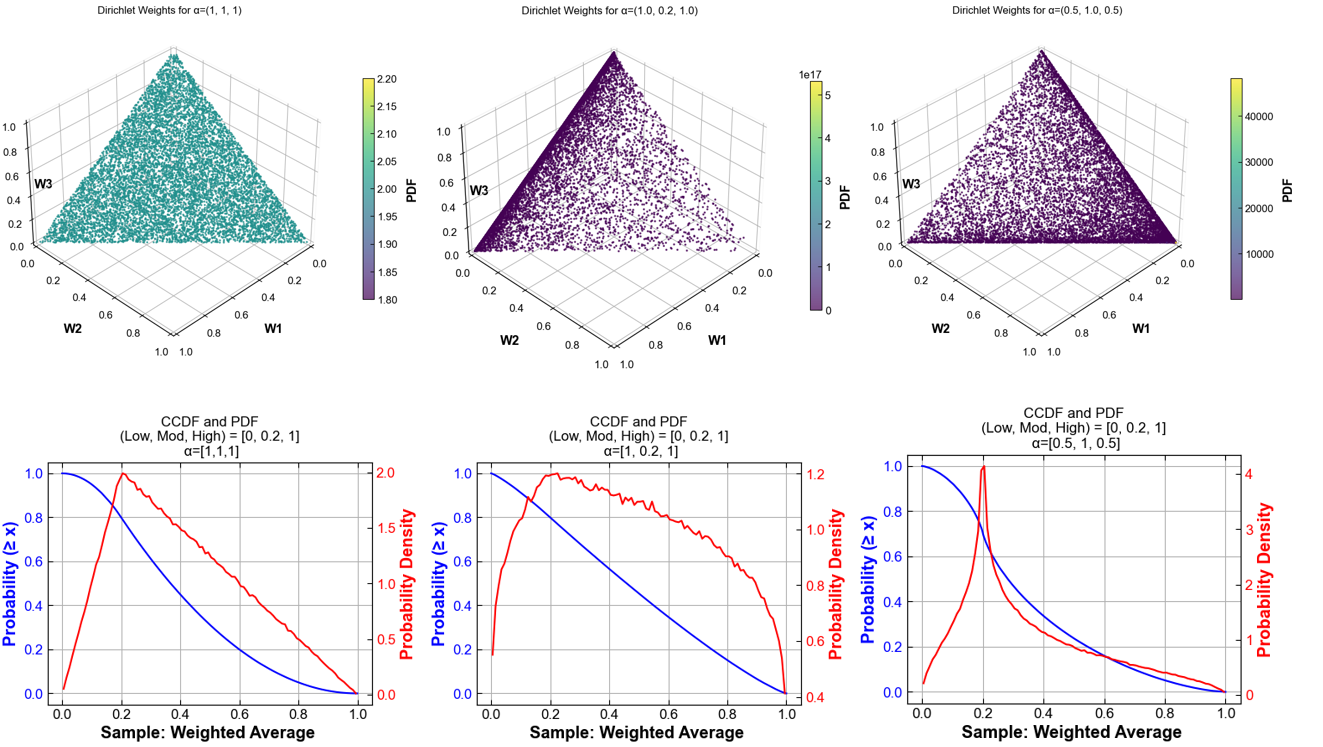
Fig. 74 Samples from a Dirichlet distribution with three concentration parameters applied to Low, Mod, High options
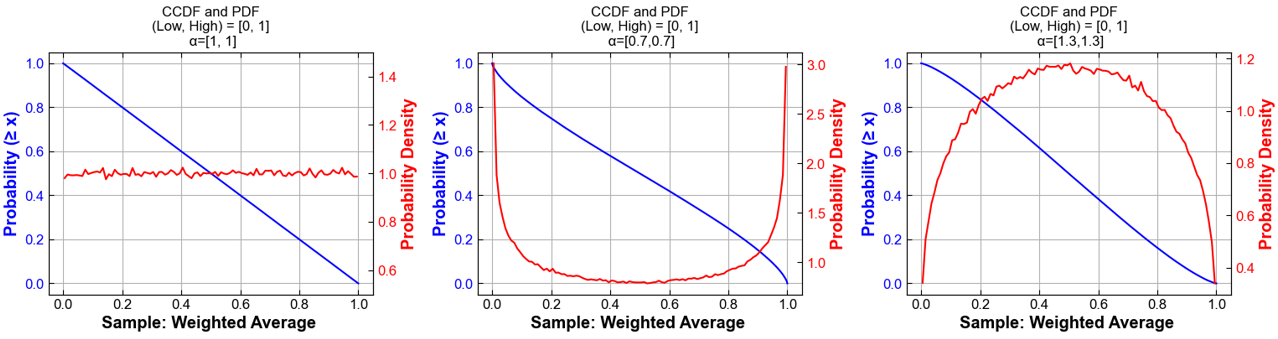
Fig. 75 Samples from a Dirichlet distribution with two concentration parameters applied to Low and High options
Built-in plotting functionality for Monte Carlo runs is described under Uncertainty Plots.
Modeling to Generate Alternatives (MGA)
The following switches control the MGA functionality:
GSw_MGA_CostDelta(default0): Fraction by which to allow objective function to increase when using MGA. MGA is turned off if set to 0; a reasonable choice for MGA is in the range of 0.01.GSw_MGA_Direction(defaultmin): Directionality of the second optimization. Options areminormax.GSw_MGA_Objective(defaultcapacity): Objective for MGA (usesGSw_MGA_SubObjectiveto specify technology subset if set tocapacity). Options arecapacity,generation,transmission,rasharing, andco2.GSw_MGA_SubObjective(defaultgentech): Technology subset to minimize or maximize the capacity of (only used forGSw_MGA_Objective = (capacity or generation)). Options are the column names in theinputs/tech-subset-table.csvfile.
Users familiar with GAMS can add alternative objective functions to the d_mga.gms file and associated options to the GSw_MGA_Objective switch in cases.csv.
By default the MGA min/max is applied to the sum of the variable across all regions being modeled. The MGA approach also supports an option to randomly sample of a vector of weights to apply to the regional values of the variable being optimized. This method can be used to characterize the uncertainty in the regional distribution of the results. Weights are sampled as discrete values from {-1,1} to allow for simultaneous minimization and maximization.
The MGA random vector capability is controlled by the following switches:
GSw_MGA_RV_runs(default0): Number of random samples of weight vectors to draw; corresponds to the number of runs.GSw_MGA_RV_region(defaultr): Regionality level (specified by hierarchy file) over which to sample the random weights.
Note that this capability is currently only supported when GSw_MGA_Objective = (capacity or generation).
Weights for each run are stored in the mga_weights parameter.
Uncertainty Plots
ReEDS includes plotting tools to help explore how uncertainty affects model results, especially in Monte Carlo or MGA-style simulations. By scanning a folder of ReEDS runs, the module reads input and output data and automatically generates a PowerPoint presentation with key trends and uncertainty ranges, along with an Excel workbook containing the raw data behind each figure.
These outputs make it easier to:
Visualize median trends and percentile bands across runs
Examine distributions of variables across sampled scenarios
Compare differences between groups of runs
Quick start: Uncertainty plots
Go to the
postprocessingdirectory.Run the command below, replacing placeholders with your paths and options.
python uncertainty_plots.py {runs_folder} \
    -p  {rename_options} \
    -hl {highlight_runs_option} \
    -t  {plot_type_options} \
    -s  {save_dir}
Arguments:
Flag |
Purpose |
Type |
Default |
Example |
|---|---|---|---|---|
|
Folder that contains the runs to plot |
Path |
required |
|
|
Rename or select runs, pairs |
List or file |
all by prefix |
|
|
Highlight runs, triplets |
List or file |
none |
|
|
Scope of plots, inputs or outputs or both |
String |
|
|
|
Output directory for the PowerPoint and the Excel file |
Path |
|
|
Example of input plots
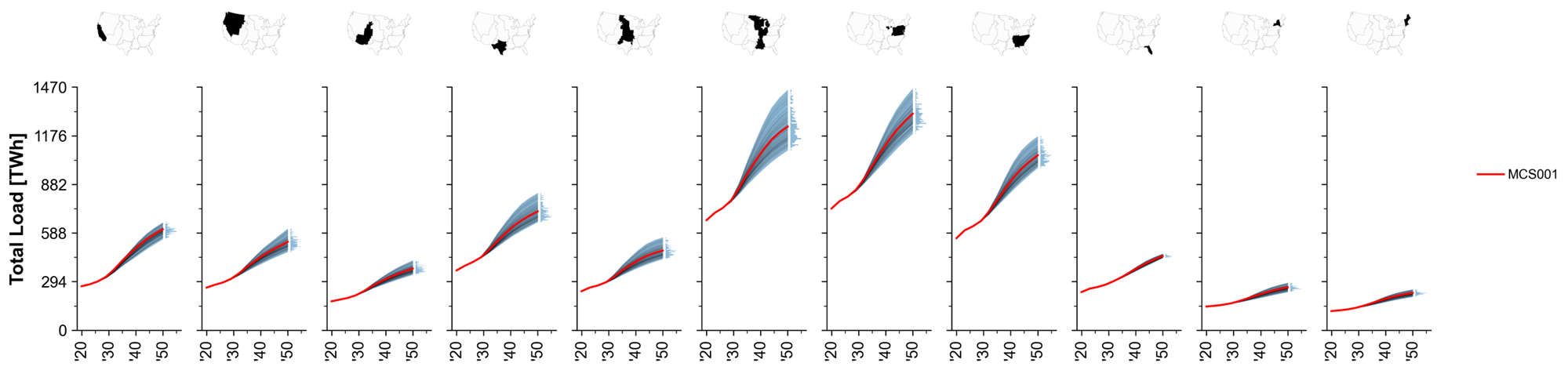
Fig. 76 MCS Example: Total system load trajectories across regions.
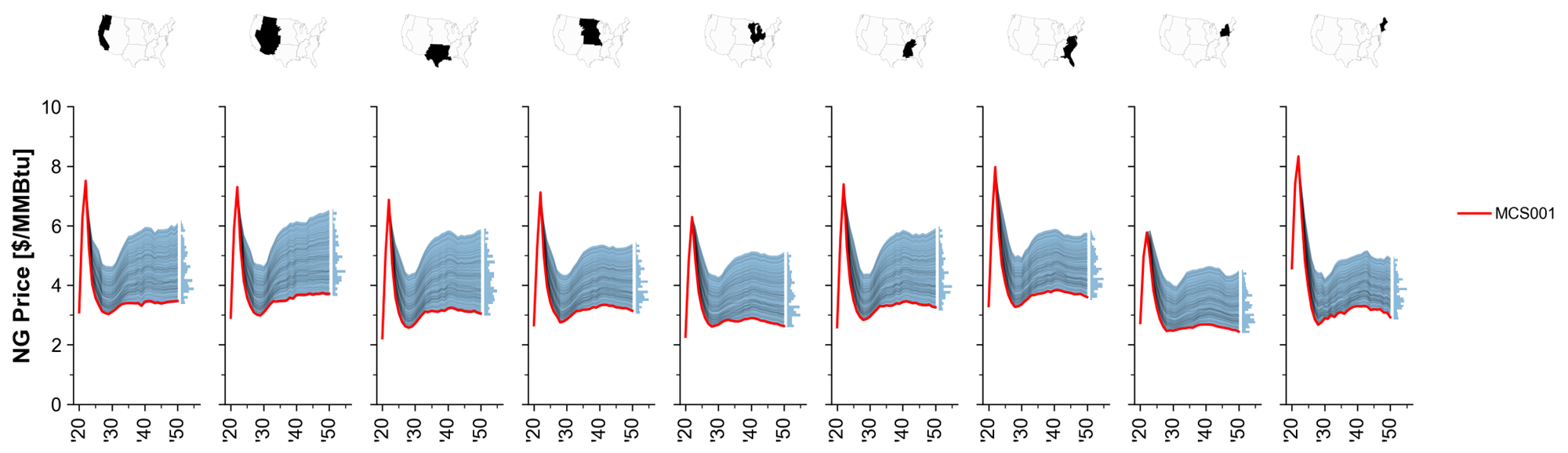
Fig. 77 MCS Example: Natural gas price paths.
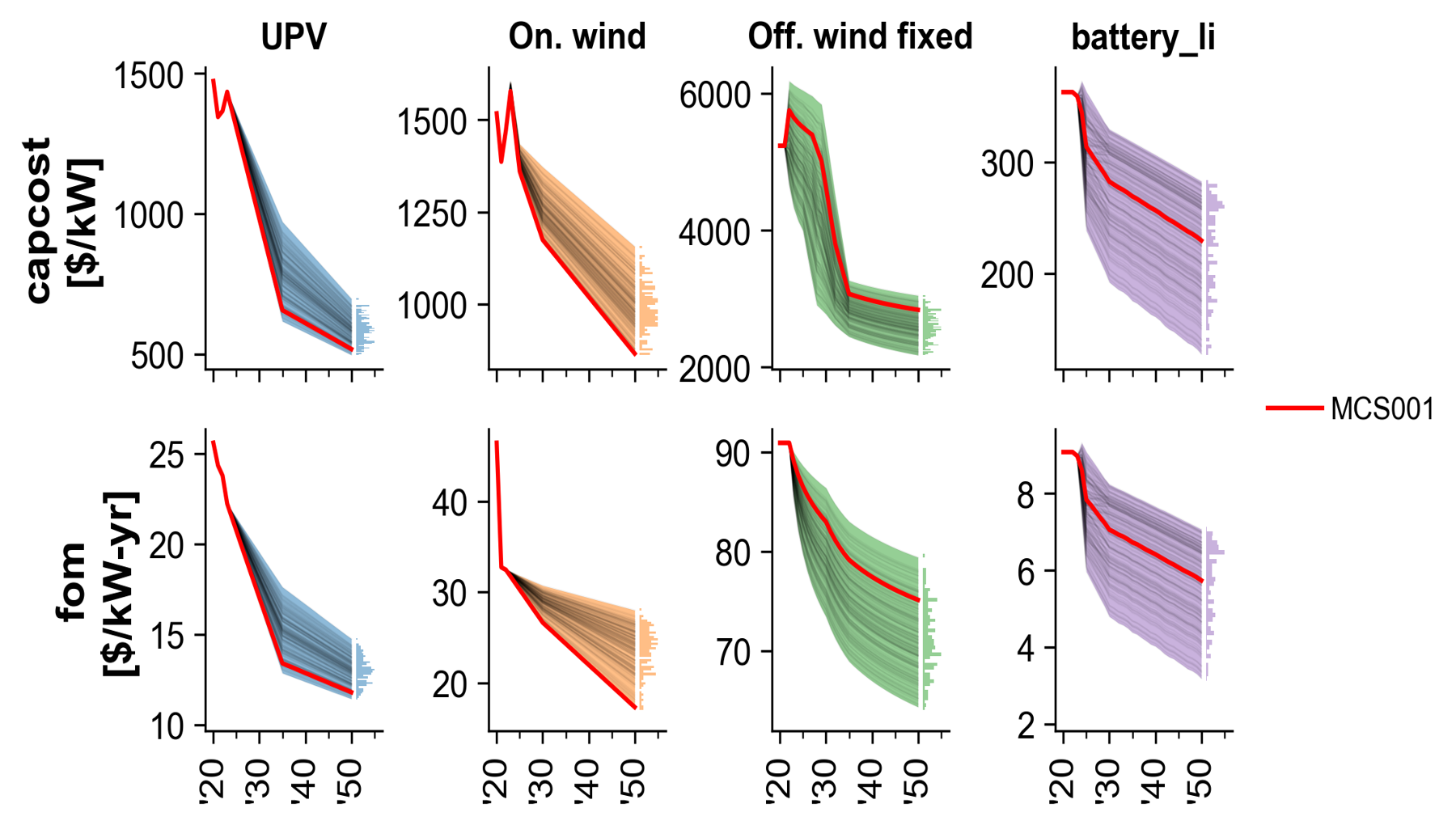
Fig. 78 MCS Example: Technology cost trajectories.
Example of output plots
Note: The simulation results shown here are for illustrative purposes only. They reflect specific input assumptions and policy configurations that are not detailed in this section, as the goal is simply to demonstrate the plotting capabilities.
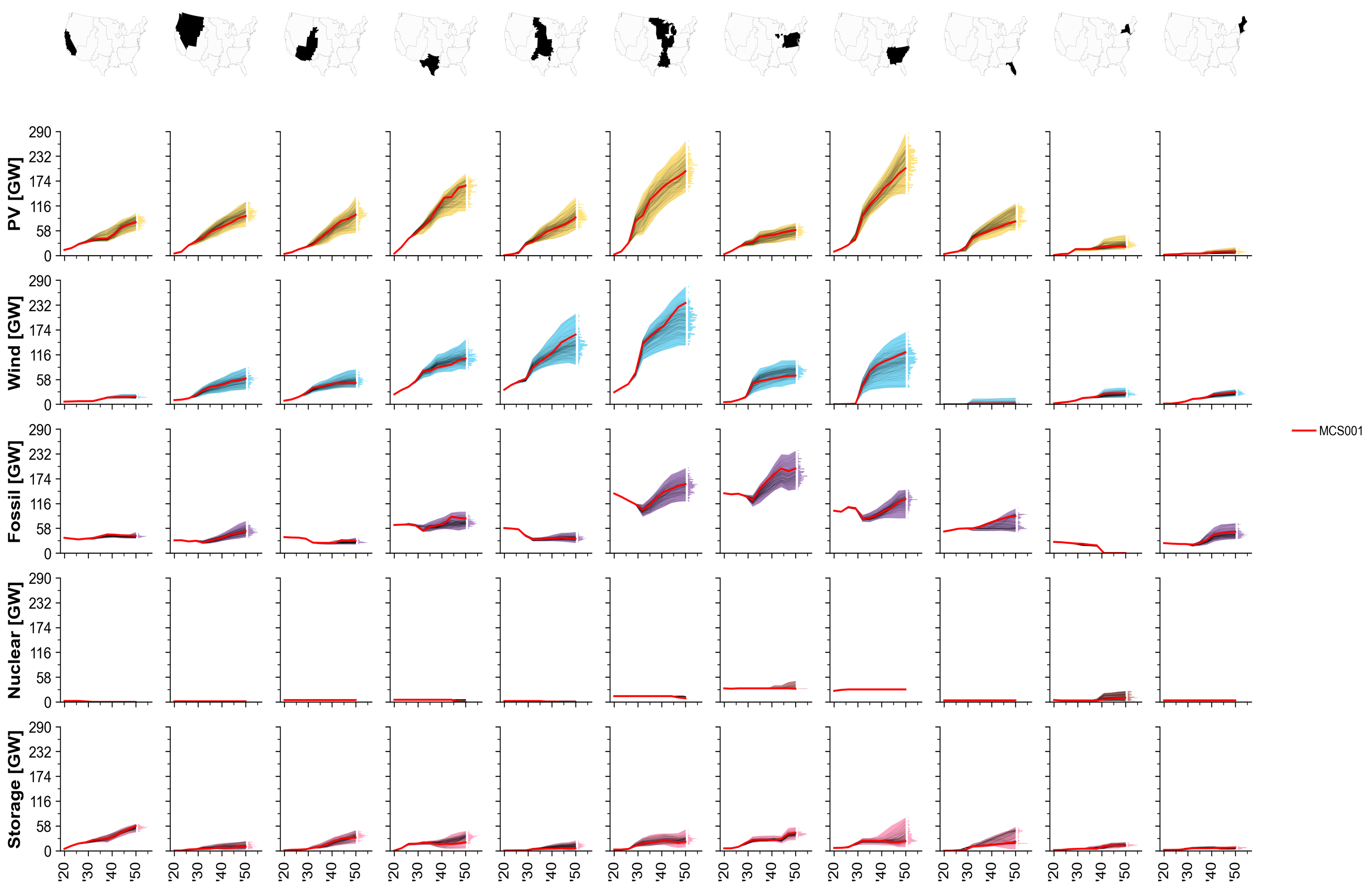
Fig. 79 MCS Example: Installed capacity by technology over time.
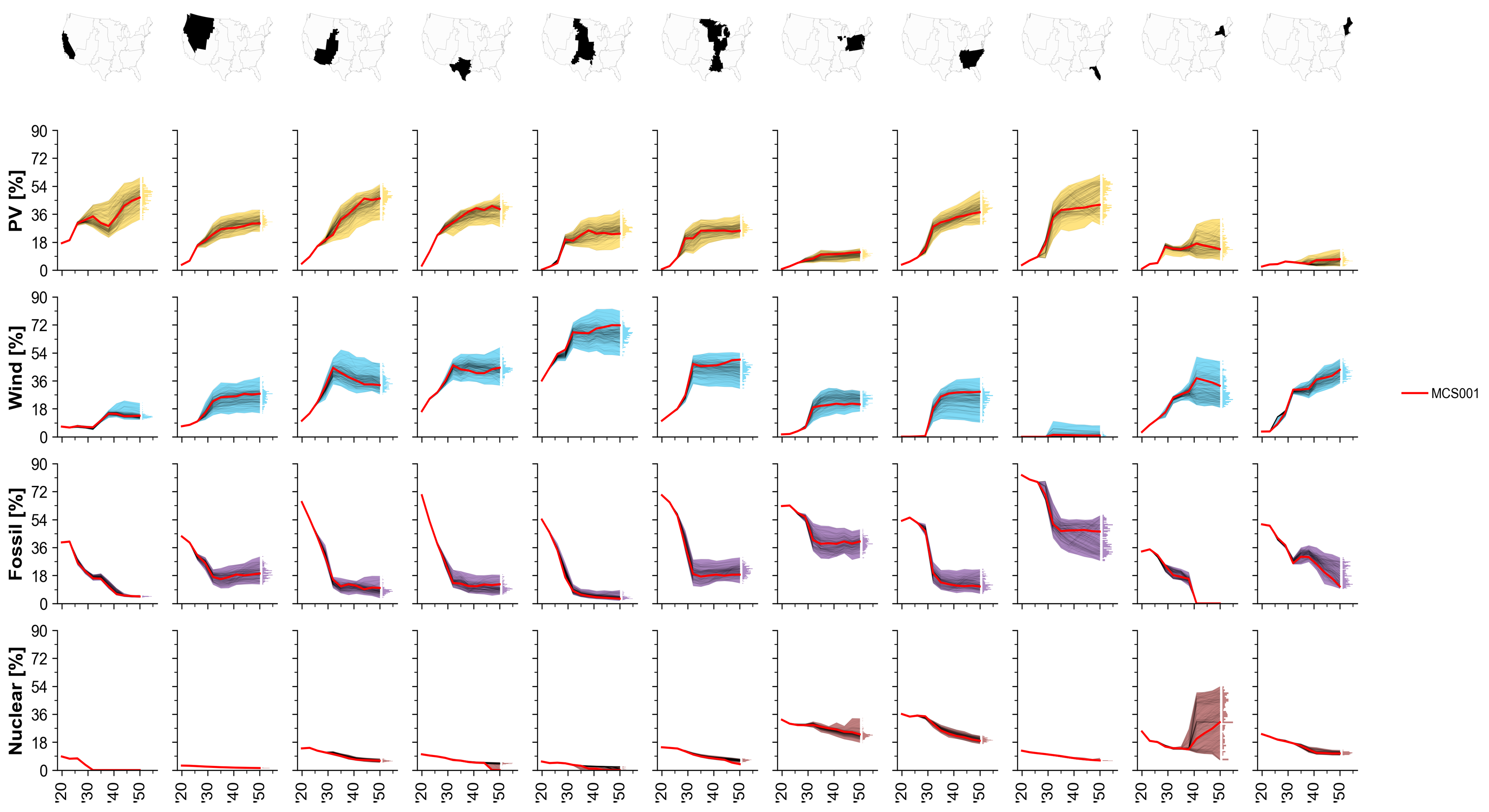
Fig. 80 MCS Example: Share of generation by technology.
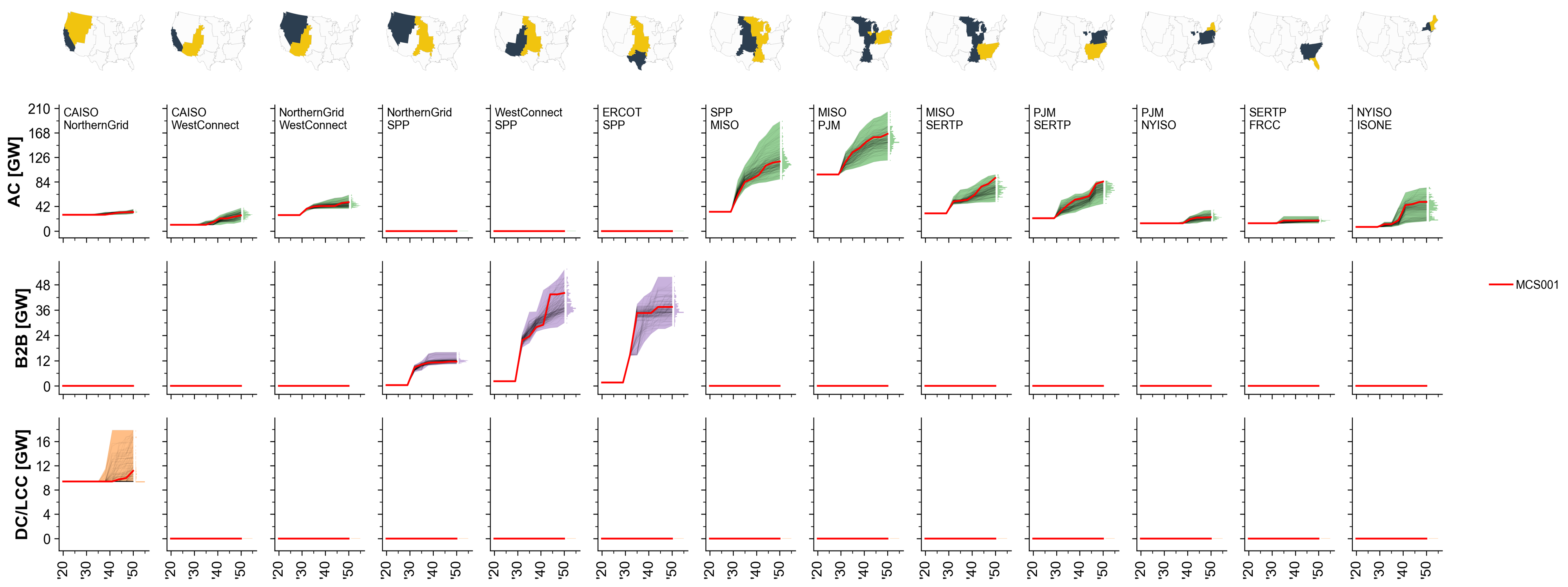
Fig. 81 MCS Example: Total transmission capacity by interface.
Hourlize
Overview
Hourlize processes hourly resource and load data into ReEDS inputs. The vision is for this module to allow maximum flexibility temporally and spatially.
Hourlize is run by a call to run_hourlize.py, which assembles information on the cases to run and then executes a call to either
resource.py and load.py. The run_hourlize.py script can be used to set up jobs to submit to the HPC to run in parallel or to run hourlize jobs directly in sequence.
Quickstart: Resource
Update the
rev_pathsfolder in ReEDS.Update settings in
config_base.jsonand the relevant tech configs (config_[tech].json) as needed (details).If submitting slurm jobs on the HPC, specify run allocation and other submission settings in
hourlize/inputs/configs/srun_template.sh(details).Run
run_hourlize.py resource(details).Update
inputs/supply_curve/dollaryear.csvif needed.If the results are intended to be used on the main branch, then after testing and quality control, upload the new profiles to the remote host as described in
preprocessing/README.mdSync up the new folders in
Supply_Curve_Datato (e.g., if you ran on the HPC, copy to nrelnas01 and Yampa).
Quickstart: Load
Update settings in
config_base.jsonas needed (details), includingload_source.If running on the HPC, specify run allocation or other submission settings in
inputs/configs/srun_template.sh(details).Run using
run_hourlize.py load(details).Outputs are written to
ReEDS/inputs/load.If the results are intended to be used on the main branch, then after testing and quality control, upload the new profiles to the remote host as described in
preprocessing/README.md.If the results are not intended for general use, they can still be used locally in ReEDS by setting the
GSw_LoadProfilesswitch to the absolute filepath of the resulting hourly demand file.
Details on setup
Config jsons
Resource mode in hourlize uses a set of json config files to provide information on how to process the supply curves. These files are located in hourlize/inputs/configs:
Tech config (
config_[tech].json): tech-specific settings for theresource.pyscript for UPV, onshore wind, offshore wind, EGS, and geohydroBase config (
config_base.json): general hourlize settings (shared) as well as specific settings for the resource and load processes
The run_hourlize.py process will generate a final config (config.json) from the relevant base and tech configs for each run. In the case of duplicated entries across configs hourlize the tech config value takes precendence.
The srun_template.sh file is used to govern HPC submission settings. Update with your allocation, email, and any other slurm specifications before submitting jobs. There is also a command line argument to via run_hourlize.py for running jobs using the debug partition.
For more details on the meaning of the different config settings see the tables in the Details on config file settings section.
Updating the rev_paths file (resource mode)
If you don’t have new reV supply curves you can probably skip this section and go down to running hourlize.
Update the fields in ReEDS/inputs/supply_curve/rev_paths.csv for the relevant techs. Some details on the columns to update:
original_rev_folder: full path of the original location of the supply curves passed by the reV team.original_sc_file: path to the original reV supply curve csv files (i.e., before hourlize pre-processing). Specified relative to the “reV” folder within the corresponding sc_path.sc_path: name of the folder to add inSupply_Curve_Datato store the reV files and hourlize results; should be of the format tech/update_name (e.g. UPV/2023_06_06_Update, ONSHORE/2023_07_28_Update).rev_case: name of the reV case to be used for this scenario; this should reference a directory in the “reV” folder with the sc_path (e.g., if 02_limited is one of the rev_case values for upv, then there should be a folder called UPV/2023_06_06_Update/reV/02_limited).cf_path: full path to the generation file used for the reV runs. This can typically be found in theconfig_aggregation.jsonfile from the reV run asgen_fpath. An exception is for bespoke wind runs, in which case this should point to the reV profiles. Not used by ReEdS but needed for R2X.
Running hourlize
run_hourlize.py
The run_hourlize.py script serves as a wrapper for calling either load.py or resource.py. It does the following:
Collect run(s) configuration settings from the relevant config files to build a consolidated config file for each run.
Runs formatting on config file entries.
Entries with {variable} in the text will have the {variable} text replaced with the value referenced by ‘variable’, which typically refers to another config entry or a file path.
Entries with {eval_expression} will evaluate ‘expression’ as a python expression; useful for creating lists using ranges.
Combines all configs into a single config.json sent to resource.py.
Creates an output folder for each supply curve run in
hourlize/out/[casename], wherecasename = {tech}_{access_case}fromrev_paths.csv.Creates a .sh or .bat script to run the case with a call to
resource.py.Optionally submits jobs to the HPC or initiates the runs directly.
Example calls:
# run load.py
python run_hourlize.py load
# run resource.py for all tech/access_case combinations in rev_paths.csv
python run_hourlize.py resource
# run resource.py for select tech/access_case combinations
python run_hourlize.py resource --tech upv --access_case limited
# if on HPC run all cases sequentially on current node without batch submission to slurm
python run_hourlize.py resource --local
# if on HPC create launch scripts and input folders but don't submit runs
python run_hourlize.py resource --nosubmit
# check status on a set of resource runs
python run_hourlize.py status
Command-line arguments can be used to run a subset of technologies or access cases.
To see details on all command line arguments run python run_hourlize.py -h.
After setting up the run, if specified run_hourlize.py will launch the .sh or .bat file which performs the following call to resource.py:
python resource.py --config /path/to/hourlize/[casename]/inputs/config.json
Tips for processing reV supply curves (resource mode)
Hourlize is currently best configured to run on the NLR HPC, with submission of parallel slurm jobs for resource processing.
By default hourlize is set up to copy outputs into the ReEDS repo (
copy_to_reeds = true).If you want the hourlize runs to be copied back the shared supply curve folder, set
copy_to_shared = true. Note that if running on the HPC you’ll still need to sync up the folders on nrelnas01 and Yampa.After running hourlize, check to make sure the supply curve folders have open permissions; if they don’t, you can set open permissions with
chmod -R 777 [folder_name].Hourlize relies on a set of columns being in the reV supply curve. In some cases hourlize can fill in missing columns hourlize in a pre-processing step, but in others these missing columns can cause hourlize to fall. A list of required columns can be found in
hourlize/inputs/resource/rev_sc_columns.csvThe dollar year typically aligns with the ATB year of the reV run, although it’s best to confirm with the reV team to make sure all their costs have been converted to that dollar year.
Resource Logic (resource.py)
Inputs
reV supply curve file (.csv), selected from
rev_paths.csvusing the case’stechandaccess_casecorresponding hourly generation profile(s) (.h5), located under the selected reV case
class mapping files specified in config files, located at
/inputs/resource(tech-dependent)
Outputs
supplycurve_{tech}.csv: A supply curve with rows for each site and columns for region, class, available capacity, and costs (e.g.,inputs/supply_curve/wind-ons_supply_curve-reference.csv).{tech}.h5or{tech}.csv.gz: Hourly capacity-factor profiles for each processed year, with site IDs, time indexes, and scaled capacity-factor values.
Outputs are stored in hourlize/out/[casename], with config options to automatically copy to ReEDS (copy_to_reeds) and the Supply_Curve_Data folder (copy_to_shared). Both options are enabled by default in config_base.json.
Logic
The resource.py script follows the following logic (in order of execution):
copy_rev_folders()Copies the original reV data specified in
rev_paths.csvto the correspondingSupply_Curve_Datafolder.
Geothermal supply-curve aggregation (EGS and geohydro only)
When
geo_run_supply_curve_aggregationis true, raw geothermal supply curves are collected across cases, optionally filtered byatb_scenario, and reduced to the lowest-LCOE entry for eachsc_point_gid.
get_supply_curve_and_preprocess()Reads the selected supply curve, applies the technology-specific
filter_colsfilters andmin_capthreshold, maps sites to ReEDS regions, and adds county/state metadata. Offshore meshing is controlled byoffshore_meshed.
add_classes()Adds a
classcolumn using static definitions fromclass_pathand/or dynamic bins whenclass_binis true. Dynamic bins useclass_bin_method,class_bin_num, andclass_bin_col; the binning logic is inreeds.inputs.get_bin().
add_cost()Adds overall and component supply-curve costs, including
supply_curve_cost_per_mw,trans_adder_per_mw, andcapital_adder_per_mw. Categories included vary bytech.
save_sc_outputs()Saves the processed supply curve as
supplycurve_{tech}.csv.
process_cf_profiles()When
process_profilesis true, reads the requested years from the reV profiles, keeps only sites present in the processed supply curve, applies UPV AC-to-DC conversion when requested, scales values byscale_factor, and writes the hourly profiles using the configured output format.
copy_outputs()Copies run outputs and configuration metadata to the ReEDS inputs and/or shared drive according to
copy_to_reedsandcopy_to_shared.
Load Logic (load.py)
See Load Quickstart at top for overall load pipeline. load.py processes the load profiles coming from EER, converting them into ReEDS model inputs. EER load profiles are originally delivered at the state, subsector level for 15 weather years (2007-2013 + 2016-2023) and 7 model years (2021, 2025, 2030, 2035, 2040, 2045, 2050), via compressed csv.gz files, in Central Standard Time (hour-ending). The basic logic of load.py is outlined below.
Where applicable, replace subsectors of EER load with other data sources as specified in
inputs/configs/config_base.jsonandinputs/load/sector_config.json.Aggregate the load profiles to the state level.
Convert the load profiles from the source timezone to the output timezone.
Remove the final day from leap years.
Details on config file settings
This section provides some descriptions and typical values for the settings in the config files (see above for a general overview of these config files).
Resource config
Setting |
Description |
Default |
|---|---|---|
class_bin_method |
Method used for dynamic class bins: ‘kmeans’, ‘equal_cap_cut’, or ‘equal_cap_man’ |
‘kmeans’ |
copy_to_reeds |
Copy hourlize outputs to ReEDS inputs |
true |
copy_to_shared |
Copy hourlize outputs to the shared drive |
true |
filetype |
Output file type for hourly profiles: ‘csv’ or ‘h5’ |
‘h5’ |
hourly_out_years |
Years to include in exported hourly profiles |
[2007, 2008, 2009, 2010, 2011, 2012, 2013, 2016, 2017, 2018, 2019, 2020, 2021, 2022, 2023] |
inputfiles |
Config entries for files to copy into the hourlize input folder |
[“reg_map_file”, “class_path”] |
offshore_meshed |
Whether to use meshed offshore transmission connections when matching supply curves to counties |
false |
process_profiles |
Whether to process and export hourly capacity-factor profiles |
true |
profile_id_col |
Unique identifier for supply-curve sites and profiles |
‘sc_point_gid’ |
reg_map_file |
Path to the ReEDS region mapping file |
‘{reeds_path}/inputs/zones/z90/county2zone.csv’ |
rev_paths_file |
Path to the file defining reV supply-curve and profile locations |
‘{reeds_path}/inputs/supply_curve/rev_paths.csv’ |
scale_factor |
Factor used to scale capacity-factor values when writing hourly profiles |
1e4 |
state_abbrev |
Path to the state-abbreviation file |
‘{hourlize_path}/inputs/resource/state_abbrev.csv’ |
subsetvars |
Columns in |
[‘tech’, ‘access_case’] |
Tech configs
Setting |
Description |
Default |
|---|---|---|
atb_scenario |
ATB scenario used when aggregating geothermal supply curves |
egs, geohydro: ‘moderate’ |
capacity_col |
Supply-curve column containing available capacity |
upv: ‘capacity_{upv_type_out}_mw’ |
class_bin |
Whether to create dynamic class bins in addition to any classes from |
upv, wind-ons, wind-ofs: true |
class_bin_col |
Supply-curve column to use for dynamic class bins |
upv: ‘capacity_factor_{upv_type_out}’ |
class_bin_num |
Number of dynamic class bins |
upv: 5 |
class_path |
Path to class definitions, or null to omit static class definitions |
upv, wind-ons: null |
filter_cols |
Column filters applied before processing the supply curve |
upv: {“capacity”: [“>”, 0]} |
geo_aggregation_method |
Method used to aggregate geothermal supply curves |
egs, geohydro: ‘lowest_lcoe’ |
geo_run_supply_curve_aggregation |
Whether to aggregate geothermal supply curves before processing |
egs, geohydro: true |
min_cap |
Minimum site capacity in MW |
upv: 5 |
profile_dir |
Directory containing hourly profile files, relative to the reV case |
upv: ‘{access_case}_ac’ |
profile_dset |
HDF5 dataset containing hourly profiles |
upv, wind-ons, wind-ofs: ‘rep_profiles_0’ |
profile_file_format |
Filename format for hourly profiles |
upv: ‘{access_case}_ac_rep-profiles’ |
process_profiles |
Whether to process hourly profiles for the technology |
egs, geohydro: false |
single_profile |
Whether all profile years are stored in a single profile file |
upv, wind-ofs: false |
upv_type_out |
UPV capacity and profile type to produce: ‘ac’ or ‘dc’ |
upv: ‘dc’ |
Load config
Setting |
Description |
Default |
|---|---|---|
inputfiles |
list of files to copy over to hourlize input folder |
[] |
legacy_ba_state_map_file |
File mapping the set of 134 legacy ReEDS zones to the states they belong to. |
‘{hourlize_path}/inputs/load/legacy_ba_state_map.csv’ |
legacy_ba_timezone_file |
File defining the timezones for the set of 134 legacy ReEDS zones. |
‘{hourlize_path}/inputs/load/legacy_ba_timezone.csv’ |
load_source |
Directory containing subdirectories named after load scenarios. Each load scenario subdirectory should contain compressed csv files (using gzip compression), each named after the relevant model year (e.g., “{load_source}/baseline/2025.csv.gz”). Each file should contain one column for each state, containing hourly load values in MW, along with “weather_datetime”, “sector”, and “subsector” columns. Each year of the datetime column should start at Jan 1, 12am. |
‘/projects/eerload/source_eer_load_profiles/20250512_eer_download/shape_outputs_2025-05-12’ |
load_source_timezone |
Timezone of the load source, assuming times are reported using the hour-ending convention. The timezone should be recognized by python (e.g., Etc/GMT+6 for Central Standard Time). |
‘Etc/GMT+6’ |
model_years |
List of model years to include in exported load profiles. |
[2021, 2025, 2030, 2035, 2040, 2045, 2050] |
replace_sectors |
List of sectors for which endogenous (with respect to ‘load_source’) sectoral load should be replaced with load from external load sources. |
[] |
replace_states |
List of lowercase names of states in the contiguous U.S. (or “all” to represent all states in the contiguous U.S.) whose sectoral load (using sectors specified in ‘replace_sectors’) should be replaced. |
‘all’ |
replacement_share |
The percentage (specified as a number from 0 to 1) of endogenous sectoral load (using sectors specified in ‘replace_sectors’) that should be removed in each model year before adding exogenous sectoral load. Dictionary keys are the model years and dictionary values are the percentages. |
{“2021”: 1, “2025”: 1, “2030”: 1, “2035”: 1, “2040”: 1, “2045”: 1, “2050”: 1} |
scenarios |
List of load scenarios (of those listed as subdirectories in ‘load_source’) to include in exported load profiles. |
[‘IRA cons’, ‘central’, ‘baseline’] |
sector_config_file |
File containing configuration defining the subsectors of each sector, the model years for which sectoral load should be replaced, and information concerning the files containing exogenous sectoral load. |
‘{hourlize_path}/inputs/load/sector_config.json’ |
weather_years |
List of weather years to include in exported load profiles. |
[2007, 2008, 2009, 2010, 2011, 2012, 2013, 2016, 2017, 2018, 2019, 2020, 2021, 2022, 2023] |
For additional information on using Hourlize, you can watch the training video: Hourlize wind/solar resource preprocessing tutorial
Troubleshooting
This section provides guidance on identifying and resolving common issues encountered during model execution. By checking the locations and files listed below, users can better pinpoint errors.
Key Areas for Error Checking
GAMS Log File
Path:
/runs/{batch_prefix}_{case}/gamslog.txtPurpose: contains the log outputs for all execution statements from the case batch file
What to look for:
‘ERROR’: will provide more information into the specific file or line in the source code that failed or has an error
‘LP status’ and ‘Status’: can provide more insight into the model run
‘Cur_year’: can help you determine which year the model run failed in
GAMS Listing Files
Path:
/runs//{batch_prefix}_{case}/lstfiles/Purpose: contains the listing files for GAMS executions
What to look for:
1_inputs.lst: errors will be preceded by****{batch_prefix}_{case}_{year}i0.lst: there should be one file for each year of the model run
GAMS Workfiles
Path:
/runs/{batch_prefix}_{case}/g00files/Purpose: stores a snapshot of all the model information available to GAMS at that point in the case execution. More information about GAMS work files can be found here: https://www.gams.com/latest/docs/UG_SaveRestart.html
What to look for:
{batch_prefix}_{case}_{last year run}i0.g00: should exist for the last year run
Output Directory
Path:
/runs/{batch_prefix}_{case}/outputs/Purpose: the outputs folder contains the generated output files from the model run
What to look for:
*.csvfiles: there should be many.csvfiles in this folderthese files should contain data, an error message “GDX file not found” indicates an issue with the reporting script at the end of the model
reeds-report/andreeds-report-reduced/: if these folders are not present, it can indicate a problem with the post-processing scripts
Resource adequacy data
Path:
/runs/{batch_prefix}_{case}/handoff/reeds_data/What to look for:
ccdata_{year}.gdx: there should be a file for each year of the model run =reeds_data_{year}.gdx: there should be a file for each year of the model run
Case Inputs
Path:
/runs/{batch_prefix}_{case}/inputs_case/What to look for:
*.csvfiles: there should be many.csvfiles in this folder, if there isn’t, it could indicate a problem with the pre-processing scriptsinputs.gdx: if this doesn’t exist, it could indicate a problem with the pre-processing scripts
Re-running a Failed ReEDS Case
To re-run a failed case from the year it failed:
Comment out all the execution statements that completed successfully in
/runs/{batch_prefix}_{case}/call_{batch_prefix}_{case}.bat(or *.sh file if on Mac)Shortcut for commenting multiple lines: Ctrl +
/(Command +/if on Mac)
Re-run
/runs/{batch_prefix}_{case}/call_{batch_prefix}_{case}.bat
Additionally, ‘restart_runs.py’ is a helper script that can be used to restart any failed runs. For more information on how to use this script, see the section on Helper Scripts and Tools.
Diagnoses of ReEDS Case
The ReEDS repository includes a diagnostic tool that provides detailed model information, such as right-hand side values, the A matrix, and statistics for variables and equations. To facilitate this, GAMS offers the CONVERT tool, which transforms a GAMS model instance into a scalar model, converting it into formats compatible with other modeling and solution systems. For more information about CONVERT, please refer to the GAMS documentation. The diagnose_process.py script, is located in “postprocessing/diagnose”, analyzes the CONVERT outputs to generate model characteristics in CSV files. These characteristics include:
The number of variables, equations, and non-zero values.
Reporting variables (if any), along with their names.
Dense columns and their counts.
Matrix statistics:
Minimum, maximum, absolute minimum, absolute maximum.
Ratio of max(abs) to min(abs).
Number of reporting variables.
Share of reporting variables in total variables.
Share of reporting variables in total non-zero variables.
Equation RHS statistics:
Maximum, minimum, absolute maximum, and absolute minimum values.
The equations with the maximum and minimum RHS values.
For more information on how to generate these report, see the diagnose documentation.